Dozzle is a great little utility container to view logs, and potentially stop and start other containers.
I had occasionally used it when in a more lengthy troubleshooting session in order to stop relying on just docker logs -f.
However, I decided yesterday to set up something a bit more permanent.
Each of my Docker hosts runs a Traefik instance to terminate SSL, and it now has a dedicated path /dozzle that takes me to the host’s logs.
However, I didn’t want to just leave my logs out there for anyone who’s on my network to see, so I put it behind OIDC authentication.
I was already using Authentik for my self-hosted OIDC needs, so I wanted to use that.
Dozzle themselves had some guidance on setting up Authentik.
Dozzle requests a non-standard “roles” claim in addition to the normal “openid email profile” scopes.
However, even with those docs it took some playing around to get this working. I will document what worked for me.
If I remember I may also open a pull request to try and improve their docs.
Create your Dozzle application and OIDC provider as normal in Authentik.
Next, go into Customization > Property Mappings, and create a new Scope Mapping.
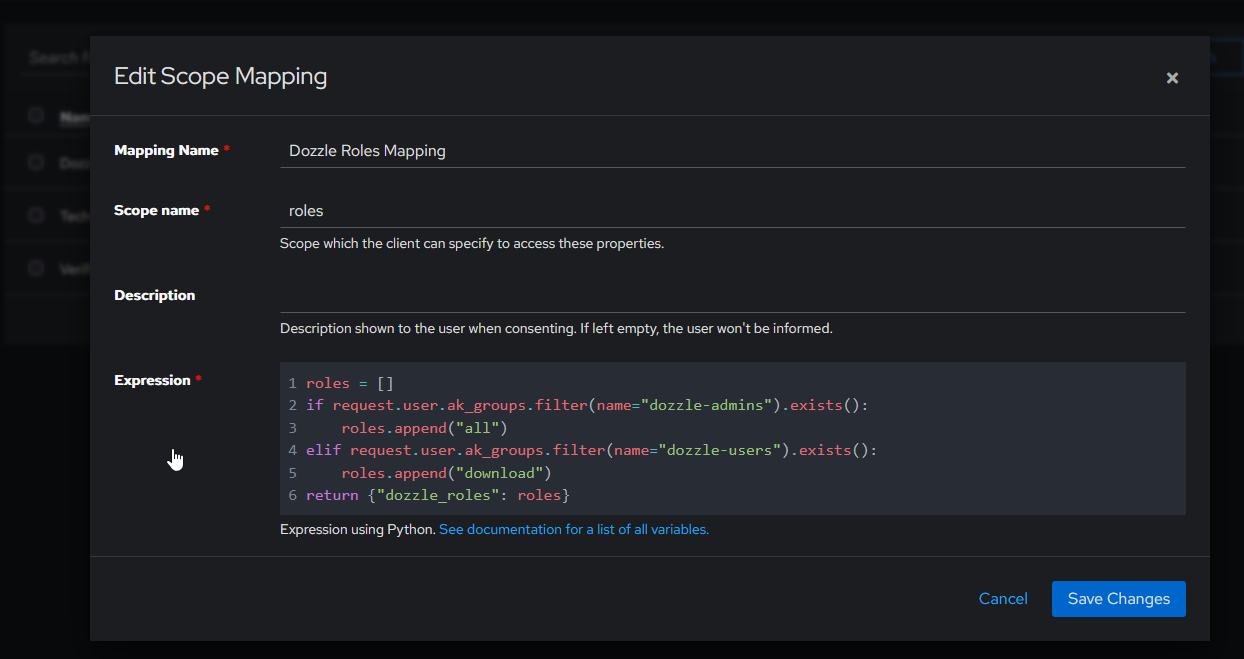
The expression, for easy copy and pasting.
roles = []
if request.user.ak_groups.filter(name="dozzle-admins").exists():
    roles.append("all")
elif request.user.ak_groups.filter(name="dozzle-users").exists():
    roles.append("download")
return {"dozzle_roles": roles}
Go to your directory and ensure that you have at least a “dozzle-admins” group created.
Your user account should be added into the group.
Edit your Dozzle OIDC provider and add the custom property mapping you created earlier to your selected scopes under “Advanced Protocol Settings”.
This is also a good time to ensure that you have the correct Redirect URIs defined.
I have a regex Authorization URI that looks like this:
^https://[a-zA-Z0-9-]+\.lan\.example\.com/dozzle.*$
You’ll need to add some environment variables to your Dozzle Docker Compose file.
It should looks something like this:
---

services:
  dozzle:
    image: amir20/dozzle:v11.3.1-alpine@sha256:55e5e0686c745314481fc24aef1aa99a741a99785b15bb0cb911b00380279429
    container_name: dozzle
    networks:
      - traefik
    volumes:
      - /var/run/docker.sock:/var/run/docker.sock
      - dozzle_data:/data
    labels:
      - traefik.http.routers.dozzle.rule=Host(`docker01.{{ TRAEFIK_HOST_DOMAIN }}`) && PathPrefix(`/dozzle`)
      - traefik.enable=true
      - traefik.http.routers.dozzle.entrypoints=websecure
      - traefik.http.routers.dozzle.service=dozzle
      - traefik.http.services.dozzle.loadbalancer.server.port=8080
      - traefik.http.routers.dozzle.tls=true
    environment:
      # - DOZZLE_ENABLE_ACTIONS=true
      # Uncomment to allow access to container shells. See https://dozzle.dev/guide/shell
      # - DOZZLE_ENABLE_SHELL=true
      # Uncomment to enable authentication. See https://dozzle.dev/guide/authentication
      # - DOZZLE_AUTH_PROVIDER=simple
      # Label this Dozzle instance (shown in the header and multi-host menu). See https://dozzle.dev/guide/hostname
      - DOZZLE_HOSTNAME=docker01
      - DOZZLE_BASE=/dozzle
      - DOZZLE_AUTH_PROVIDER=oidc
      - DOZZLE_AUTH_OIDC_ISSUER=https://{{ AUTHENTIK_HOST }}/application/o/dozzle/
      - DOZZLE_AUTH_OIDC_CLIENT_ID={{ dozzle_oidc_id }}
      - DOZZLE_AUTH_OIDC_CLIENT_SECRET={{ dozzle_oidc_secret }}
      - DOZZLE_AUTH_OIDC_ROLES_CLAIM=dozzle_roles
      - DOZZLE_AUTH_OIDC_SCOPES=roles

volumes:
  dozzle_data: